

JR Academy courses
Explore JR Academy courses in languages, practical skills and business. Each course will state its teaching language, level, audience and access terms.
Business Records Essentials
Learn to organise business records, check a supplier invoice against an order and delivery note, and prepare a month-end handoff.
From a course search to a shortlist
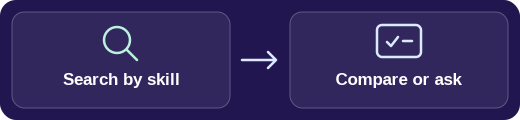
Search for one broad topic, such as English, spreadsheets or accounting. Choose All subjects while you are exploring, then narrow by subject when options appear. If a specific title brings back no results, clear the search and try the skill you want to learn.
When a course looks promising
Save the two closest matches and compare what you would actually practise. If you need to explain a spreadsheet at work, an option with a reporting exercise may suit you better than one focused on formulas. Check that you can use the required software and that any live sessions fit your time zone.
If you are unsure about one detail, note the course name and ask about it. For example, ask whether practice files are included or whether a live session has a replay. Check the published fee and how long you can access the materials before you enrol.
Try a short exercise before you choose
Try one task before comparing JR Academy courses. Allow 10 to 15 minutes and use paper, a notes app or a spreadsheet. Work through the task, then open the self-check.
Ask two clear questions in English
A colleague writes, “Please share your draft before the review.” You have the draft ready. Reply in two or three sentences in English. Acknowledge the request and ask for a deadline and a place to send the file.
Check your answer. “Thanks, I have the draft ready. What time do you need it, and where should I upload it?” Check that your reply asks for a specific time and a destination. Then say it aloud as if you were speaking to your colleague.
Check a supplier total in a spreadsheet
A supplier lists 12 notebooks at $3.50 each, six packs of markers at $4.00 each and eight folders at $2.25 each. The stated total is $88.00, with all charges included. Create columns for item, quantity, unit price and line total. Compare your sum with the supplier’s.
Check your answer. The line totals are $42.00, $24.00 and $18.00. They add to $84.00, a $4.00 difference. With headings in row 1, enter =B2*C2 in D2, copy it to D3 and D4, then enter =SUM(D2:D4) in D5. Change the folder quantity to nine. The sum should update to $86.25.
Turn a meeting decision into a team action list
For this team training exercise, plan an update to a welcome email. The draft is due Tuesday at noon, approval Wednesday at noon and release Thursday at 10 a.m. Assign each task to the writer, reviewer or support lead. List what each person needs to start and what happens if approval is late.
Check your answer. The writer hands off the draft to the reviewer. The support lead needs the approved text and checks it in a test inbox before release. Pick who flags late approval and when. Keep the current message in use until the revision is approved and tested.
Record one thing you could do independently and one you want to practise next. If you’re choosing team training, have two colleagues try the same task and compare where they needed help.
When you cannot find a match
Use the enquiry form to describe one task you want to learn, what you can already do and when you need to start. If you have not chosen a subject, tell us about a situation you want to handle better. For team training, add the approximate group size and the language your team uses at work.
Find a subject that fits your goal
Start with a task you want to do independently. Use the examples below to choose a subject and prepare questions about course level, teaching language and time commitment.
Languages
Think about where you will use the language. A travel goal might be to ask for directions. A workplace goal might be to join a meeting or write a clear email. Tell us which language you want to learn and what you can already do in it.
Practical and digital skills
Choose a task you can practise with your own material, such as organising a spreadsheet, planning a budget or preparing a presentation. When a course opens, compare the tools it uses, the exercises it includes and any knowledge you need before starting.
Business and team training
Start with a decision or process you want to handle better. Examples include evaluating a business idea, keeping track of invoices or helping a team follow a shared workflow. For team training, share the group size, the skills to develop and the working language.
How to compare JR Academy courses
Choose one task you want to do with greater confidence. These three examples show how to compare JR Academy courses when enrolment opens and how to explain your goal if you are still deciding where to start.
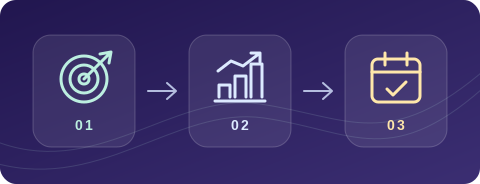
Three things to check before choosing a course
- Learning goalName one task you want to do independently.
- Starting levelCompare the prerequisites with what you can already do.
- Practice timeChoose a schedule you can keep each week.
Use a language in a real conversation
Start with a situation you can describe. You might need to take a phone call, ask questions during a trip, or explain a delayed order at work. Write down what you can already say or understand and which part usually slows you down. This makes it easier to judge whether a beginner or intermediate course fits your starting point.
When course details are published, compare the teaching language, practice activities and expected outcomes. A learner who wants to speak more confidently will benefit from opportunities to rehearse conversations and respond to follow-up questions. If you are choosing for a child, share their age range and one activity they would enjoy practising.
Build a skill you can practise every week
Pick a task with a concrete result. For a spreadsheet course, that might mean producing a monthly spending summary from a list of transactions. For presentation skills, it might mean explaining a proposal in five slides and answering questions about it. Try the task once using sample material and note where you get stuck.
Check which tools and prior skills a course expects. A good fit gives you time to practise, a way to check your work and a result you can reproduce with different material. Set aside time to repeat the exercise after each lesson. Use dummy figures or public examples when your normal work involves confidential information.
Improve one business or team process
List one process the learner or team handles regularly, such as preparing invoices, documenting a handover or reviewing a supplier proposal. Describe the usual inputs, the decision someone has to make and the result they need to produce. If several roles are involved, note which tasks each group performs.
For team training, compare the working language, delivery format, time zones and opportunities to practise with realistic examples. Decide how you would recognise improvement afterwards. A team learning to handle handovers might agree on a common checklist and try it with a sample case. Send the group size and a short example when you enquire.
For a starting point in language learning, compare your current skills using the Council of Europe’s language self-assessment grid.
